Learn what modern data quality tools do, why they matter, and how they use AI and automation to keep your data trustworthy.
Table of Contents
Like this article?
Follow our monthly digest to get more educational content like this.

Data quality tools are platforms that centralize the practices for maintaining the integrity and accuracy of an organization’s data. Choosing the right data quality tool lets data reliability teams worry less about developing quality and structural management procedures from scratch, owing to automation and AI-augmented features.
The diversity and scale of data have created a need for purpose-built tools over manual data quality checks. In this article, we explain the best practices for selecting data quality tools and the most important features to consider.
Summary of key features of data quality tools
What is a data quality tool?
Simply put, a data quality tool is a software application used to monitor, analyze, and improve data reliability. It connects to your data sources—such as databases, data warehouses, and data lakes—and monitors the data that flows through them continuously to discover errors, anomalies, and inconsistencies automatically instead of writing SQL or programmatic manual checks. It centralizes data profiling, rule enforcement, monitoring, alerting, and issue remediation for teams in a single, uniform experience.
A data quality tool enforces data quality across the data quality dimensions that define the caliber of the data.
Organizations can benefit from data quality tools to manage their evolving data, as manually setting rules will eventually break down. This is a pain point that data engineers face as their data grows and evolves beyond simple rules.
For example, in a retail company, data engineers may write strict, hard-coded rules to filter out incorrect zip codes in the USA. If the company expands its market into other countries, such as Canada and the UK, their hard-coded rules would exclude the correct alphanumeric zip codes for countries other than the USA. This is no one’s fault but rather a natural evolution of the data. This scenario can be avoided by using a data quality tool that adapts to the data rather than hard-coded rules that break during business expansion.
Broad integration
A good data quality tool saves you the burden of setting up multiple tools (like many companies do). This can take days, if not weeks, and happens not because they actually want to use many tools but because most tools have limited integration with a wide range of data sources. The other pathway is for some companies to force their data into a specific supported data store, which creates ETL overhead and sacrifices the original data store's native capabilities solely to accommodate a data quality tool with limited integration.
The data lives in multiple places and comes from many sources. Managing more than one tool can be a complicated task as the number of tools grows over time to support newly adopted sources. For example, an organization might have a Snowflake data warehouse, a PostgreSQL database for transactions, and an S3 data lake for files. This necessitates a comprehensive integration tool to manage data quality across sources. A tool with broad integration capabilities lets you gain centralized control over your data.
Working with scattered data quality tools can make it harder for stakeholders to understand their data, as most lack a UI. The disconnect caused by fragmented tools slows integration and undermines stakeholders' centralized visibility. While AI can generate reports on the fly, the complexity of secure integration, orchestration, and governance across multiple data sources is time-consuming. Having a data quality tool with broad integration enables stakeholders to access all data quality insights instantly, reducing delays and the need to wait for reports.
{{banner-large-1="/banners"}}
Data quality profiling
Data profiling is the process of understanding data traits. Without a clear comprehension of the data, it is not possible to set rules for how good data should be. An organization without a data quality tool must conduct profiling steps like manually querying tables, calculating statistics, identifying patterns, and documenting the entire process for reproducibility. A good data quality tool automates profiling, making it easy to establish a baseline for what good data looks like.
The discovery of data characteristics relies on three main pillars to profile the data:
- Structural: This type of data quality checks assesses data format, types, dimensions, and shape.
- Content: This type evaluates characteristics such as value frequencies, numeric distribution, outliers, duplicates, and missing values.
- Relationship: These checks identify the relationships among data sets through columns they share, such as foreign keys and references.
For example, suppose that an organization trains a machine learning model on customer orders. A data quality tool that profiles the data might show the following:
- Null analysis (structural): 10% null values in customer_id detected
- Duplicate detection (content): 0 duplicates in order_ids found
- Outlier identification (content): 90% of discounts fall in a range from 5% to 25%.
- Schema validation (relationship): 90% of orders have valid references to existing customer IDs
This profile enables rule generation for enforcement in subsequent stages: When null values appear in customer IDs or a 200% discount is specified, the quality tool can detect it early, preventing bad data from reaching the model to avoid model drift.
Using a data quality tool for automated profiling saves a massive amount of time by eliminating the need to manually profile each data set in the data source.
Quality rule management
While profiling observes how the data looks, rule management dictates how the data should look. Quality rules are a set of rules used to assess data conformity across the 8 dimensions of data quality; failing to meet them indicates lower data quality. These rules ensure that data quality meets the organization's or business's defined standards, including accuracy, completeness, consistency, and timeliness.
For example, suppose you have data that comes from an orders table from an ecommerce platform. This data contains order_id, customer_email, date, and total_amount.
A reliable data quality tool will not only check whether an email address is present but also whether the email format is correct, including the @ sign and a proper domain name. Here, the customer with order ID 1002 has an email address that is incorrectly formatted. This fails the email format check, and the defined email validation rule is not satisfied.
Another example is the total amount for order ID 1003. It shows a negative number; assuming returns are handled in a separate table, an item value cannot be negative.
When evaluating a data quality tool, one that automatically generates most of the rules while leaving room for complex manual rules to match business logic is better than manual rule-setting for every column in your dataset. Automation allows faster setup and allows the rules to be adjusted as the data evolves.
Alerting and remediation
Data engineers cannot check the tool every second or minute to find failed rules. Alerting is the automated process of notifying the relevant parties when a data quality rule fails or an anomaly occurs, for example, receiving an alert in the form of a Slack message when the customer ID column contains a null value. Missing important failed rules or data quality assessments harms the pipeline and eventually the decisions made based on the data.
Alerting channels
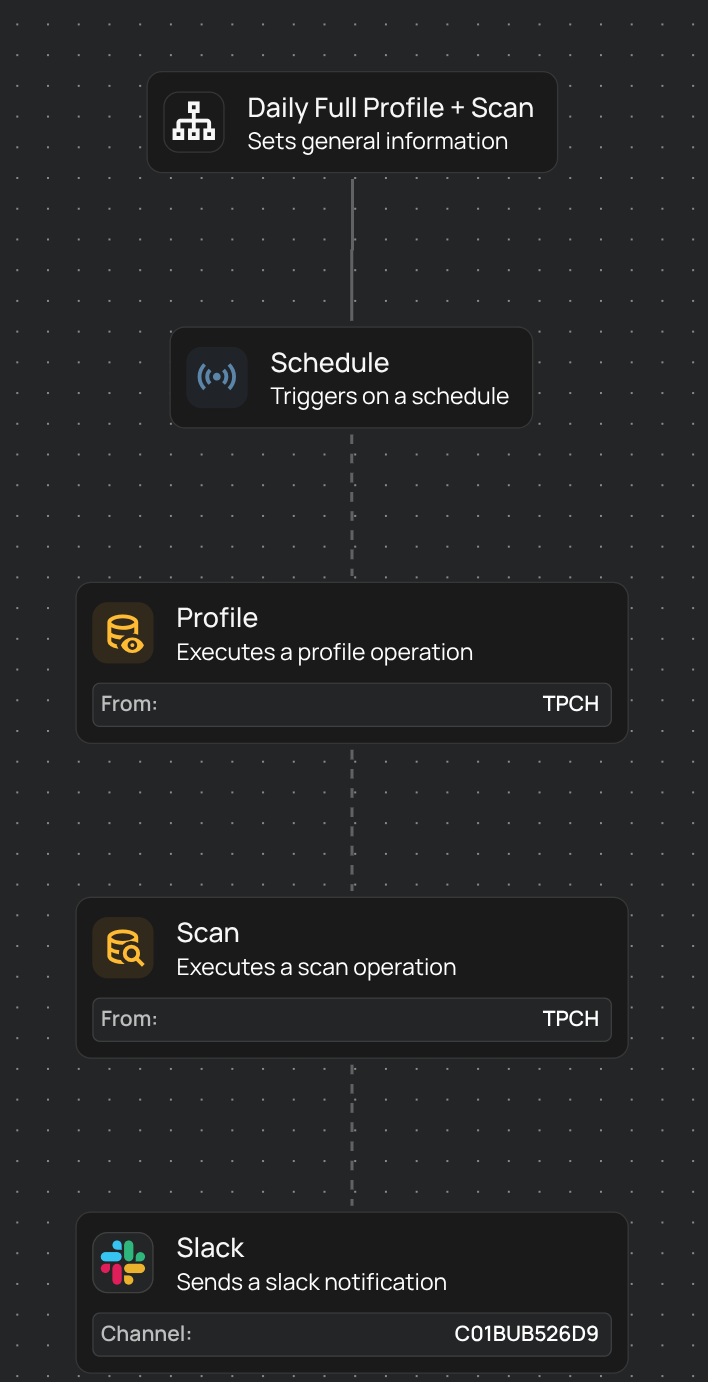
When assessing a data quality tool, consider one with easily set up messaging channels for team collaboration to resolve data quality issues promptly. This helps teams redirect messages to their preferred channel, create an audit trail and direct issues to other team members with accountability.
For example, a team can direct alerts to a Slack channel or Jira tickets based on their needs.
Remediation and audit trails
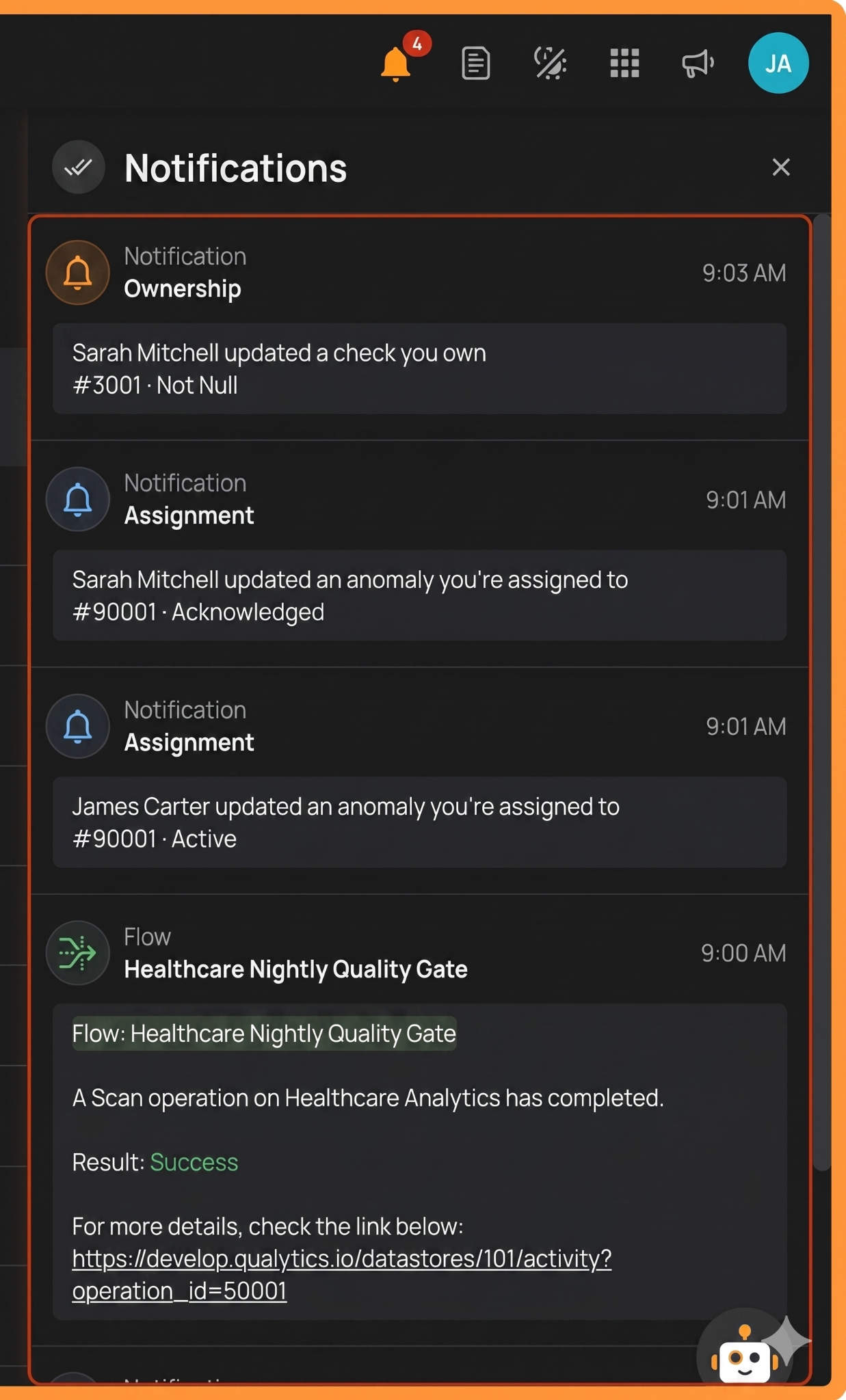
While alerts provide information about failed rules, remediation defines how to address them. A good data quality tool allows teams to configure remediation channels, assign the issue to the intended team member, and follow up on resolution progress. Some data quality tools offer automated remediation workflows with review and approval loops to avoid causing unintended data issues in production environments.
Tracking remediation actions creates an audit trail for compliance and helps with monitoring recurring issues. Here is an example of an audit trail via notifications.
AI augmentation
Setting data quality rules manually or using static predefined templates requires significant effort, time, and attention to keep them functional. A smart data quality tool uses AI to generate appropriate rules that profile the existing data, understand patterns, and infer constraints.
For example, Qualytics automates around 95% of data quality rules through a comprehensive AI-augmented scan and data profiling. This approach not only helps generate relevant rules for the data but also supports rule evolution as data changes over time, with distributions shifting and patterns changing.
User inputs, such as manually setting data quality rules and correcting generated AI rules, are important because AI rules are probabilistic and may not accurately capture business logic in highly domain-specific data. These inputs are combined to retrain the AI systems that govern the rules, enabling better rule generation in the future and greater adaptation to the data. This reduces the false alarms and improves the rule adjustment.
Collaboration
A unified data quality platform enables teams to communicate, discuss, and resolve issues using a single source of truth. This eliminates rule conflicts, drift, and collisions that occur when teams work in isolation.
A good data quality tool makes sharing rules and baseline libraries seamless across teams within an organization, ensuring that they share a common understanding of the acceptable data quality standards. Not setting a baseline and rules for what data quality looks like erodes the trust in the data and introduces siloed workflows.
For example, suppose that two teams in an organization measure churn rate using different rules inside different tools. At the end of the quarter, the first team provides a dashboard with X churned users, and the other team provides a report with Y churned users. This can affect downstream decisions based on this data, such as discounts offered and users notified of the discount. The siloed workflows resulted in different numbers and, consequently, a lower impact from marketing campaigns, leading to money being directed to the wrong group.
API, CLI, and MCP access
A flexible data quality tool meets users where they work, allowing access via a terminal, an API, or an AI chatbot.
API and CLI access
Choosing a data quality tool with an API-first architecture allows native integration with CI/CD pipelines to catch data quality issues before they reach an organization’s systems, preventing downstream impact.
Additionally, data engineers who prefer direct terminal access benefit from access to command-line interface (CLI) integration to monitor data quality, fix issues, gain quality insights, and dive deeper into failed rules with the ease of low-code development.
MCP integration
The Model Context Protocol (MCP) enables you to connect LLMs to external systems. Using MCP to connect an LLM to your data quality tool allows users to set rules and make other API requests using natural language, rather than writing code or using a UI.
The MCP server enables secure interoperability with supported AI models (LLMs), integrating them into enterprise workflows to run commands and facilitating capabilities discovery for both current and newly released features. For example, Qualytics’ API-first architecture naturally supports MCP server integration, allowing users to set rules by telling the LLM to apply a specific rule to a field in a table from a data source.
MCP server security considerations
Although the MCP server is a powerful tool, it also poses security concerns as you connect an LLM. A security-aware data quality tool can help mitigate these risks:
- Context and prompt injection: This occurs when a malicious actor misleads or influences an LLM's behavior to make decisions in the attacker's favor. While the issue is still under research, a tool built with security in mind does not trust LLM outputs, it validates commands before executing them, and it logs all interactions, significantly reducing risk.
- Scoping and least-privilege access: A good data quality tool provides granular access controls to limit MCP access to the minimum required, such as read-only access for data discovery and granular write permissions only when needed.
- Authentication and encryption: Authentication is essential between the MCP client and server. Ensure that TLS is used to encrypt the connection to the MCP endpoint.
- Data exfiltration: The tool should prevent sensitive data from being logged or exposed to the LLM. Frequent log auditing reduces the risk of prompting the LLM to extract sensitive information and catches unusual patterns.
Agentic AI access
In the context of data quality, AI agents help discover and prioritize data quality issues and address them. On an enterprise scale, the number of issues can be massive; this is where agentic AI helps manage priorities across them, identifying, prioritizing, and helping resolve them.
AI agents work by calling tools, and an API-first data quality platform with well-documented schemas is the foundation for Agentic AI workflows. However, to operate effectively, AI agents should be fed semantically meaningful, scoped, and structured data responses rather than raw JSON responses from the API, thereby improving their reliability and efficiency.
In addition to these tasks, agentic AI can support chatbots by generating simple rules from plain language. Agents can suggest fixes, evaluate, and make decisions to improve data quality. For example, Qualytics Agent Q can handle tasks for you, and its agentic workflows can prioritize an urgent data issue and either open a Jira ticket or send a Slack message to a specific channel.
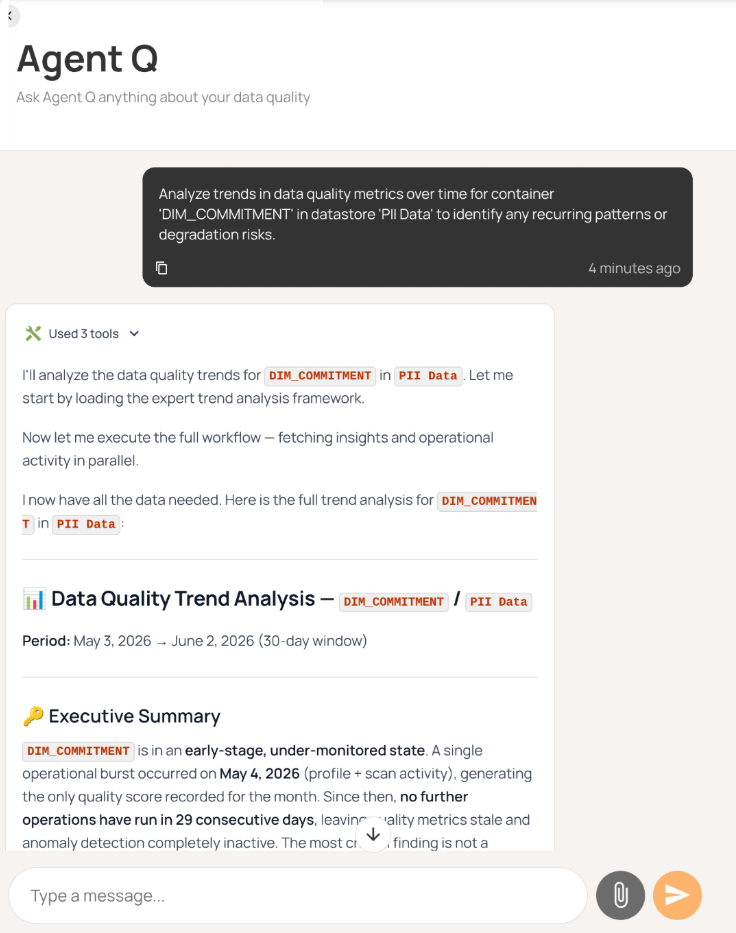
Note that while autonomous AI agents are powerful, they make mistakes. That's why human review is required for their calls, using a human-in-the-loop to correct, redirect, and guide the agent back onto the right path.
{{banner-small-1="/banners"}}
Last thoughts
In this article, we examined the most important features a good tool should have, such as broad integration, automated profiling, rule management, alerting, AI augmentation, collaboration, MCP access, and agentic AI workflows. The features in this article serve as a baseline for what a modern data quality tool should look like. Data quality tools like Qualytics leverage these features at enterprise scale, helping teams manage data quality to meet organizational standards and build trust in their data.
Chapters
Improving Data Governance and Quality: Better Analytics and Decision-Making
Learn about the relationship between data governance and quality, including key concepts, implementation examples, and best practices for improving data integrity and decision-making.
Data Quality Checks: Tutorial & Automation Best Practices
Learn the fundamentals of data quality checks, like structural and logical validation, monitoring data volume, and anomaly detection, using practical examples.
Data Quality Assessment: Tutorial & Implementation Best Practices
Learn systematic approaches to assess data quality using automated tools and best practices for reliable validation.
Data Quality Dimensions: A Complete Guide with Examples
Learn the eight data quality dimensions every data engineer needs to ensure reliable, accurate data pipelines.
Data Quality Scorecard: Dimensions, Granularity, and Best Practices
Learn how a data quality scorecard helps you measure, track, and improve your organization's data quality.
What to Look for in Data Quality Software: A Guide to Features
Learn which data quality software features help teams build and sustain scalable, automated quality programs.
From Reactive to Reliable: A Guide to Modern Data Quality Frameworks
Learn the six core components of a data quality framework and how they work together to ensure reliable data.
Data Quality Automation: How Modern Platforms Validate at Scale
Learn how automated data quality platforms infer validation rules, detect anomalies, and support remediation at scale.
Data Validation Software: 10 Must-Have Features to Look For
Learn how to evaluate data validation software using 10 must-have features for scalable, automated data quality.
The Data Quality Maturity Model: A Six-level Model for AI Readiness
Learn the six-level data quality maturity model that maps your organization's path from ad hoc fixes to proactive AI-augmented governance.
Data Quality Metrics Examples: The Complete Guide
Learn how to turn abstract data quality dimensions into computable, actionable metrics that catch pipeline failures and data errors before they become incidents.
How to Choose the Best Data Quality Tools for Your Team: Key Features and Benefits
Learn what modern data quality tools do, why they matter, and how they use AI and automation to keep your data trustworthy.