Learn which data quality software features help teams build and sustain scalable, automated quality programs.
Table of Contents
Like this article?
Follow our monthly digest to get more educational content like this.

Data quality tools have evolved through three generations. The first relied on hand-rolled SQL assertions and one-off scripts, which were adequate when data volumes were small. Second-generation platforms centralized rule execution but still required engineers to author every check manually, creating unsustainable maintenance burdens as data estates grew. Modern platforms represent the third generation: They combine automated inference, AI-driven augmentation, and API-first architecture to make quality enforcement sustainable at enterprise scale.
In this article, we explain what sets top data quality software apart from older tools. The article focuses on features that help quality programs scale alongside growing data volumes, more complex schemas, and larger teams.
Summary of essential data quality software features
{{banner-large-1="/banners"}}
Multi-source connectivity
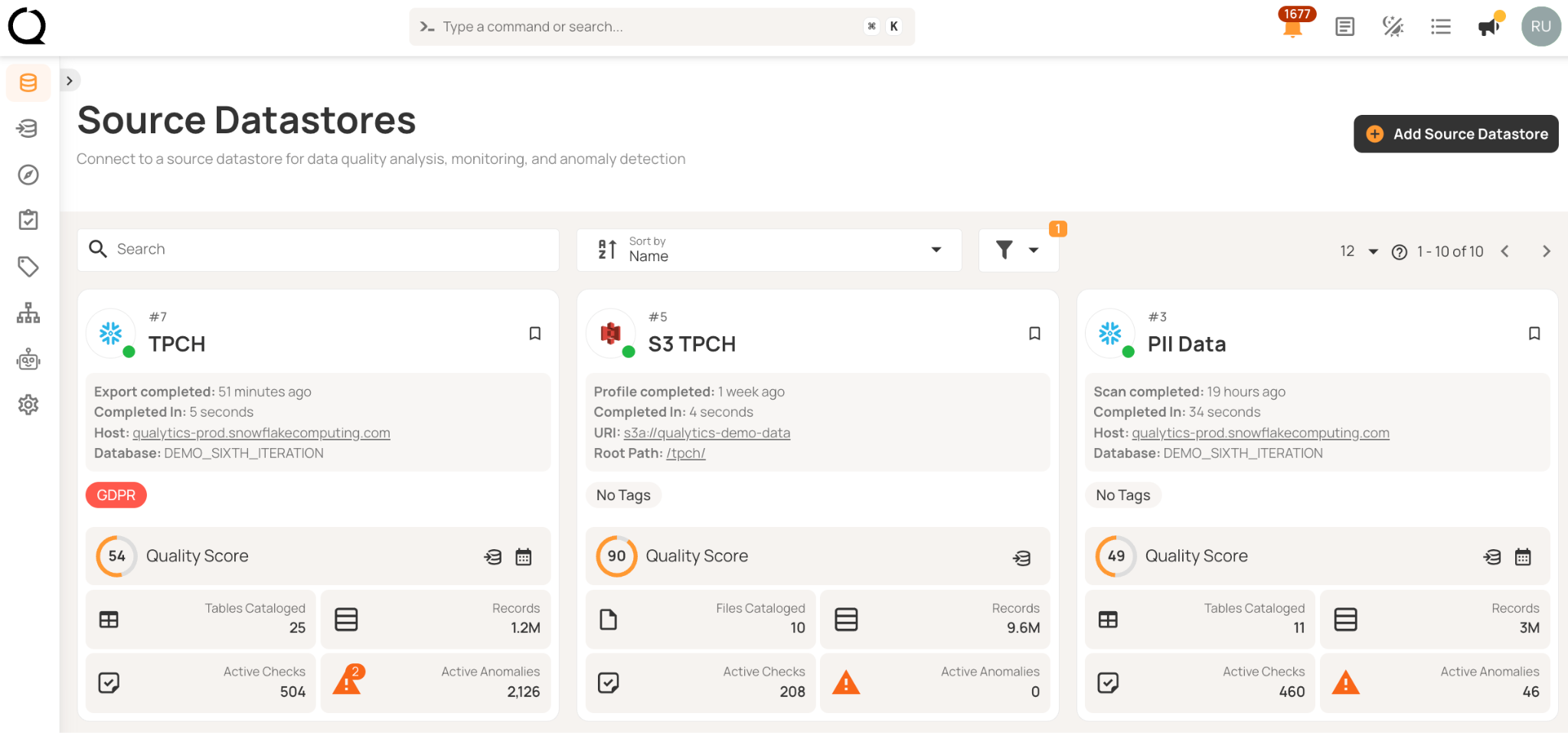
Look for platforms that support all the storage technologies your organization uses, such as cloud warehouses like Snowflake and BigQuery, object stores like S3 and Azure Blob, and relational databases. If a platform only supports a few connectors, you may end up splitting quality checks across different tools or missing important data sources.
Automatic schema discovery at connection time eliminates integration work. You shouldn't need custom connector development, mapping files, or weeks of engineering effort to profile a new datastore. For example, here’s how Qualytics demonstrates multi-source connectivity.
Credential reuse becomes critical at scale. Configure authentication once for production, then apply it across development, staging, and disaster recovery. Platforms should encrypt credentials at rest and in transit, with support for secure secret management systems like HashiCorp Vault, AWS Secrets Manager, or Azure Key Vault. This prevents credentials from scattering across hundreds of configuration files while ensuring they're never stored in plain text.
Data profiling
Profiling sets the statistical baseline for automated quality checks. Choose platforms that collect detailed information for each field (such as data type, percentage of nulls, unique values, minimum and maximum, mean, median, and standard deviation) and distribution metrics like kurtosis and skewness.
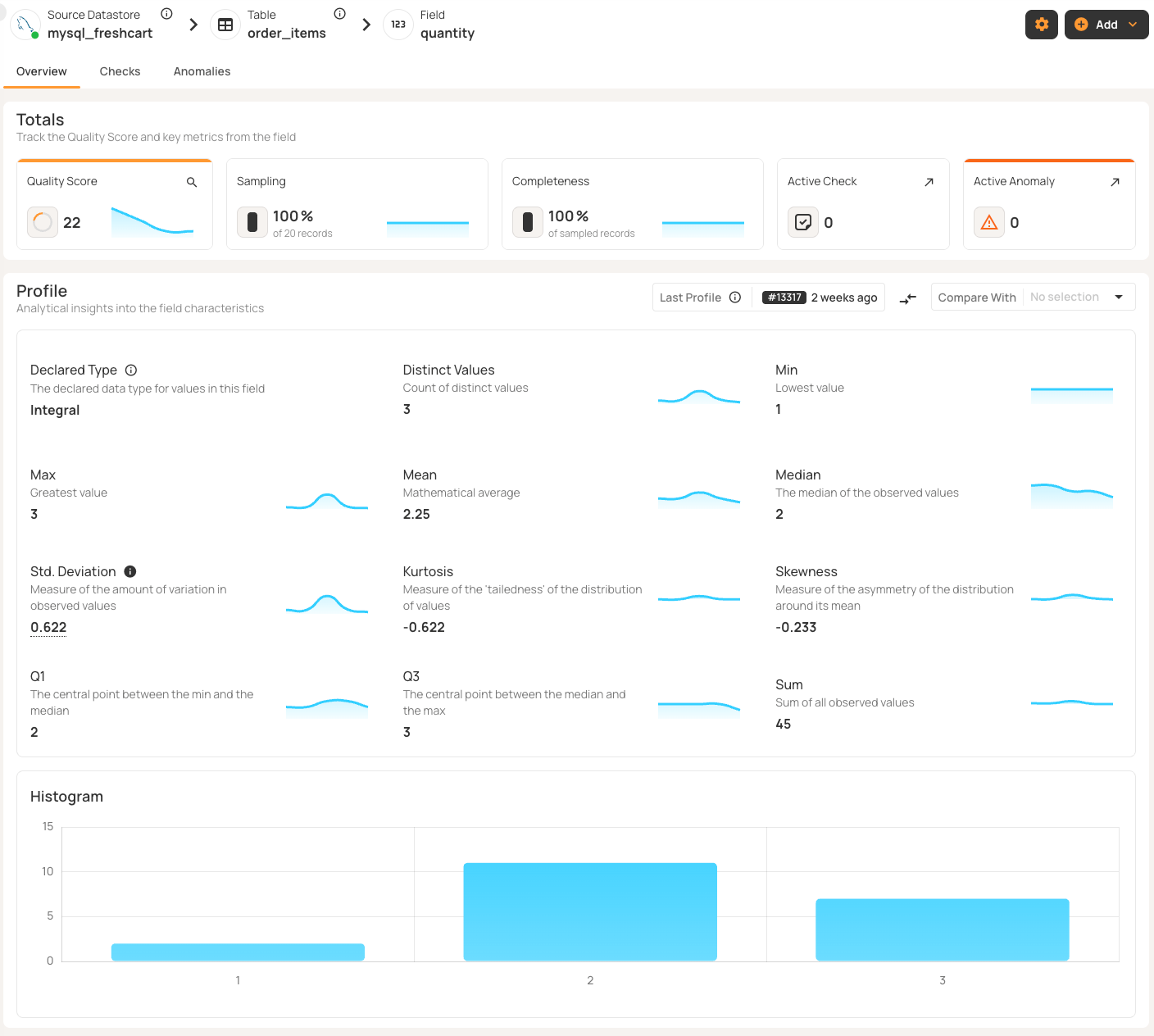
Check if the platform lets you balance thoroughness with computing costs. You should be able to set how aggressively it creates validation rules based on patterns it finds. For very large tables, record limits help you sample just enough data without using too many resources.
Think about how the platform updates these baselines as your data changes. Scheduling profiling—daily for fast-changing data, weekly for slower data—keeps the platform in sync with reality. Without regular profiling, baselines get outdated and validation rules may no longer match your data.
Automated rule inference
Manual rule authoring scales linearly with data growth. If you add ten tables, you need to write checks for each one. Obviously, this approach doesn't work when you have thousands of tables.
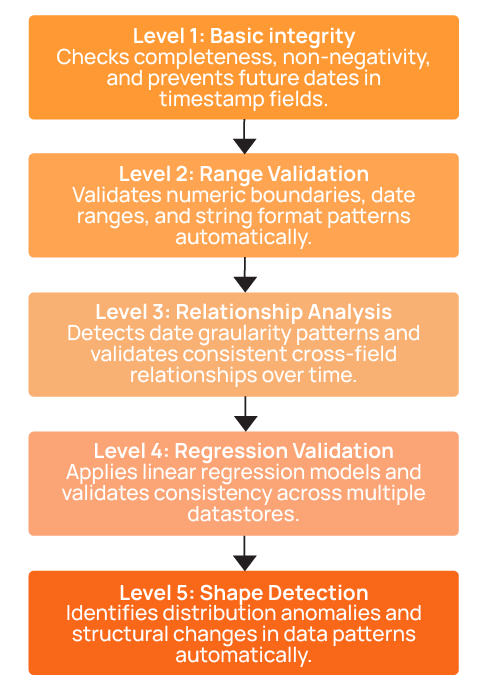
Look for systems that can automatically create validation rules at multiple inference levels. For example, consider a five-level system:
- Level 1 covers basic data integrity like completeness, non-negativity, and non-future dates.
- Level 2 adds value ranges and string patterns.
- Level 3 introduces time series analysis and comparative relationships.
- Level 4 includes linear regression and cross-datastore validation.
- Level 5 adds distribution shape checks that detect structural anomalies.
Top platforms can automatically create about 95% of checks. For the remaining 5%, some business rules still need to be written manually, but using templates can cut this work from weeks down to hours.
Dry-run mode lets engineers review before activation, approving sensible rules and rejecting false positives. Look for platforms that use supervised learning to get better at making accurate rules over time based on this feedback.
Manual methods take hours for each table, but platforms that use inference keep the effort manageable. The process should be simple: Set up once, keep profiling, and approve rules as needed. This approach makes a program scalable.
Centralized rule management
Quality checks work like code and need version control and lifecycle management. Without proper oversight, teams risk duplicating checks, running into logic conflicts, and losing track of active rules.
Make sure the platform offers reusable templates for different datasets. For example, a “valid email” template can check email columns everywhere without repeating work. If you update the regex, all related checks update automatically.
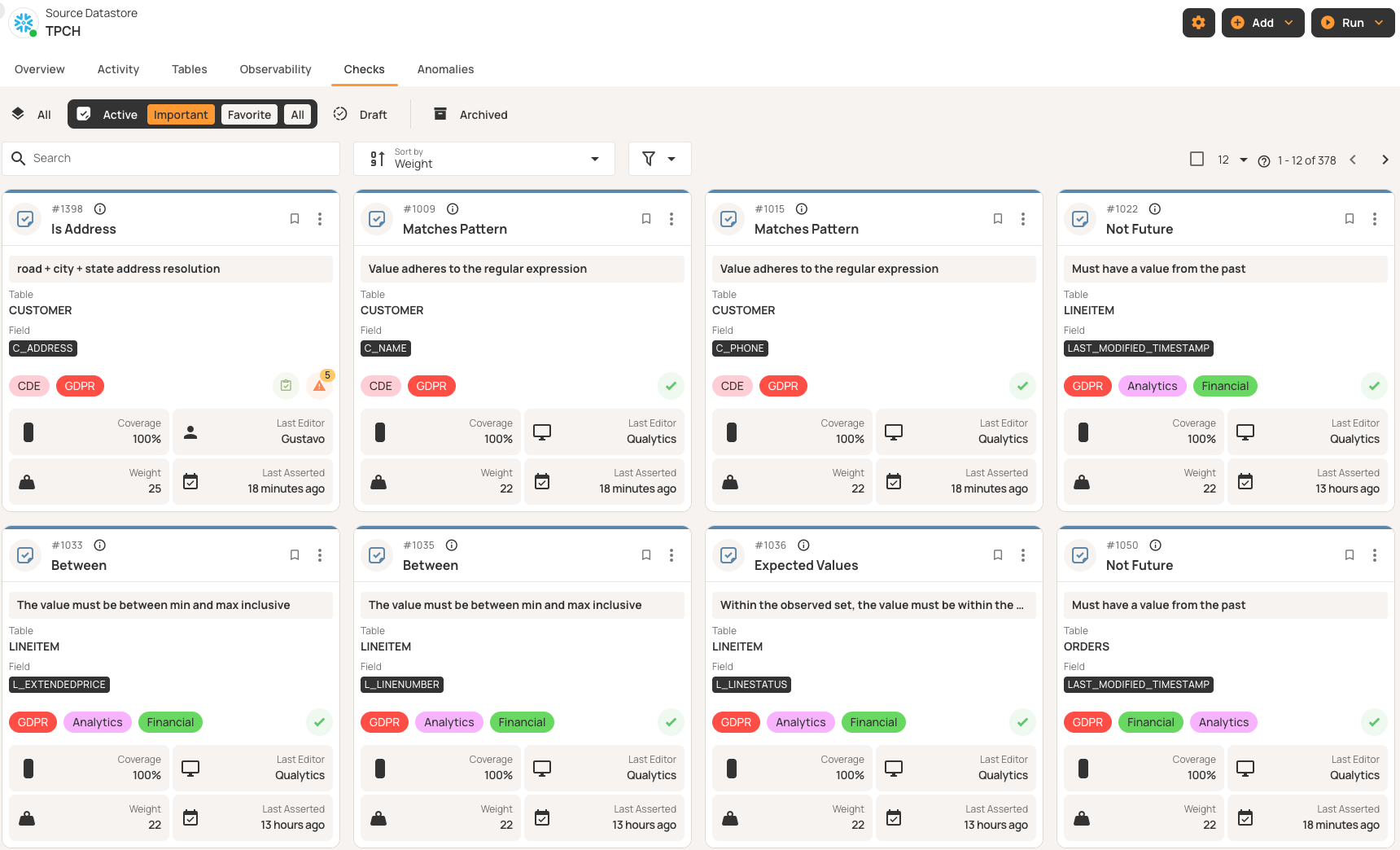
Lifecycle states help you track each rule as it moves from draft to active use, then to archive or invalid status. Effective platforms show which rules are being reviewed, which are running, which are saved for history, and which no longer fit your current data.
In compliance-focused environments, audit trails are essential. Make sure the platform records who created or changed each rule and when it happened.
Continuous monitoring and detection
To enforce quality, you need monitoring in three areas: content quality (validation checks), volumetrics (record counts), and freshness (arrival timeliness). Look for platforms that monitor all these areas simultaneously instead of requiring separate tools for each, reducing operational complexity and ensuring consistent schedules. Monitoring all dimensions together also maintains data coherence. When quality checks, volume trends, and freshness alerts are synchronized, you get a complete picture of data health at any point in time.
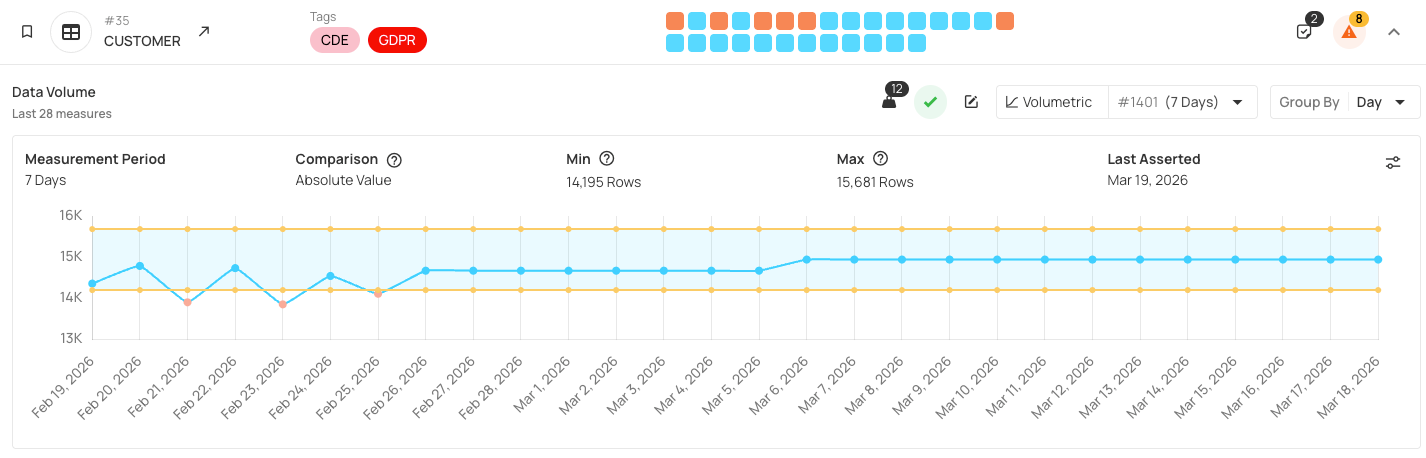
If you catch issues when data comes in, they take minutes to fix; if end users find them, it can take hours or days and hurt your reputation. Regular, scheduled monitoring helps you spot problems early before they spread. Continuous monitoring means scheduled scans that run automatically (daily for most tables, hourly for critical datasets, or triggered after pipeline completion). Incremental scanning checks only new or changed records since the last run, making frequent monitoring cost-effective. Regular scheduled monitoring enables platforms to learn from your data patterns over time and adapt future rule automations based on observed behavior, setting the stage for the real-time data quality required for AI agents and copilots.
Alerting and remediation workflows
Detection without remediation is pointless. Platforms should send anomalies to the right people with enough information to act. Lifecycle states help track each anomaly as it is detected, acknowledged, investigated, resolved, or marked invalid.
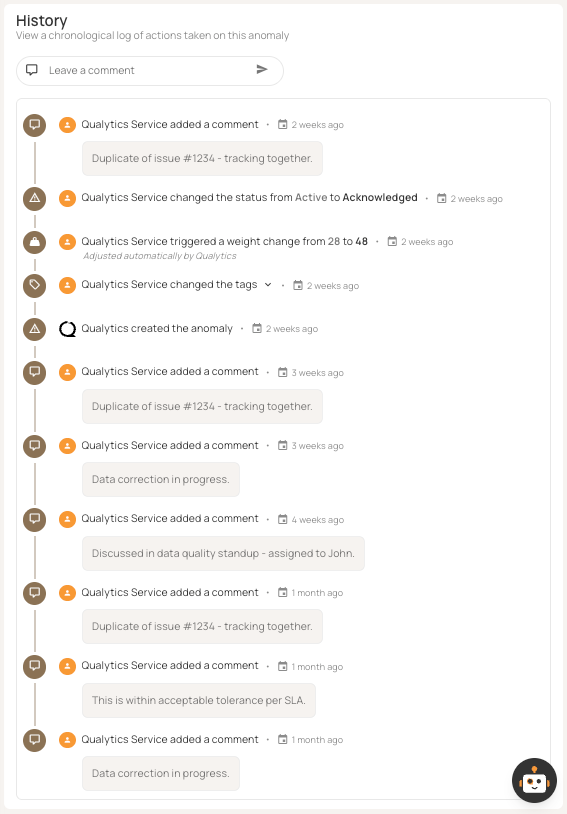
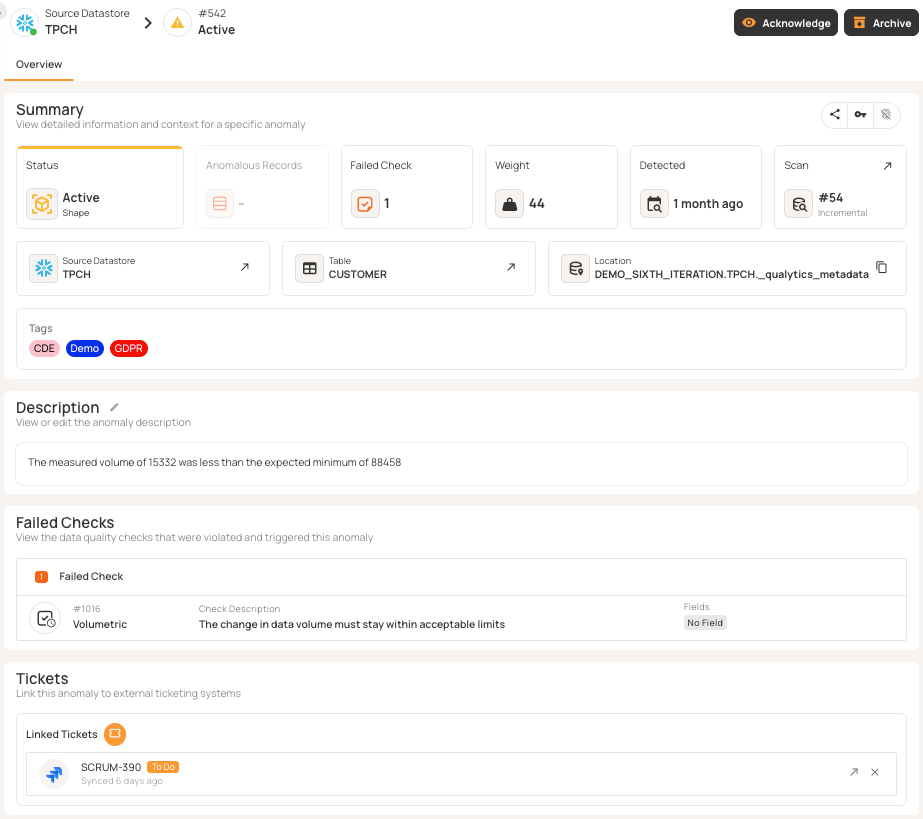
Integration with Slack and Teams provides immediate visibility—threshold breaches trigger notifications with details and links. Alert routing by severity, domain, and impact ensures that the right teams respond. Beyond real-time alerts, integrating with ticketing tools like Jira, ServiceNow, and PagerDuty formalizes how you fix issues and helps track service-level agreements (SLAs). Effective setups create incidents with priorities and escalation paths, turning ad hoc fixes into a structured process.
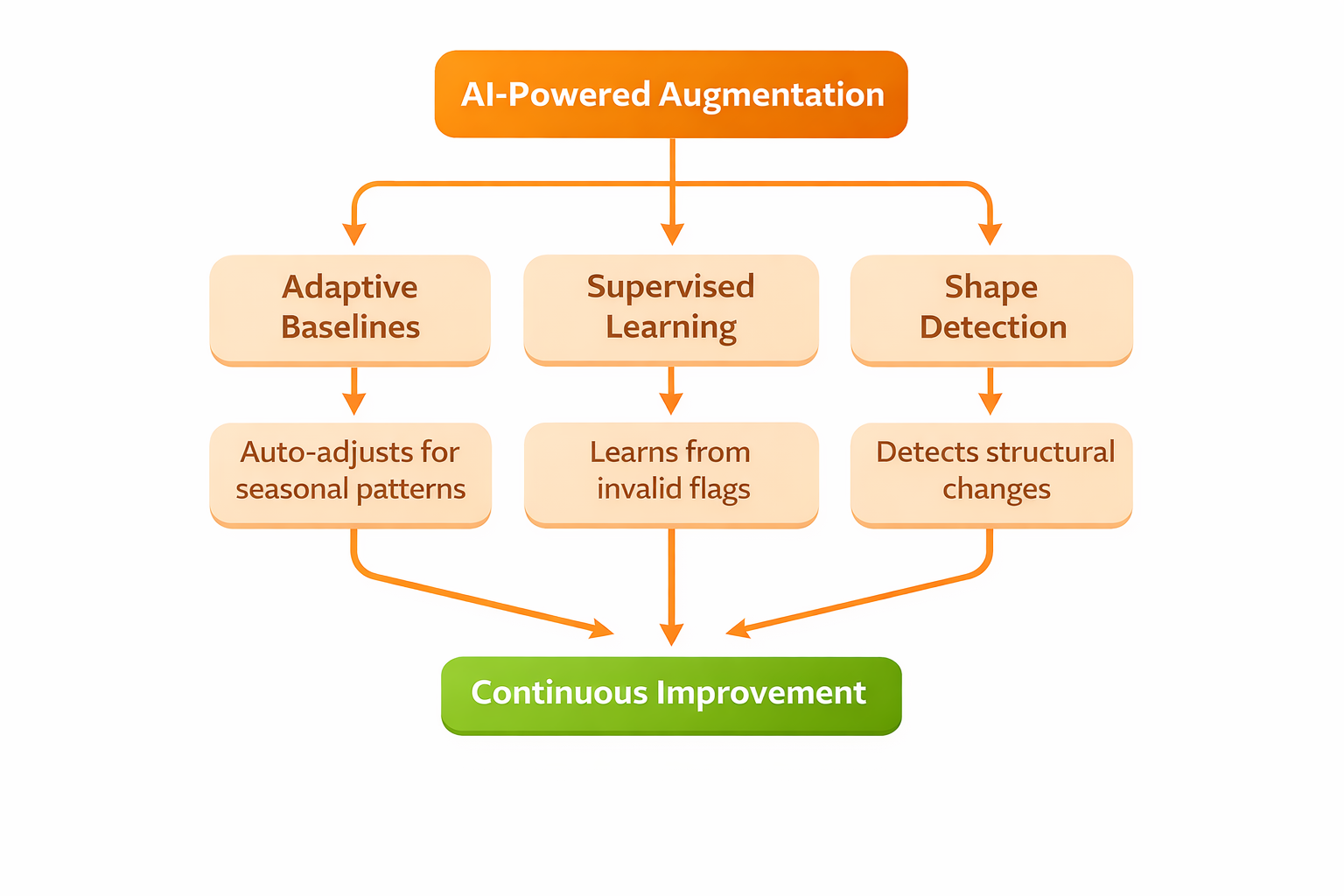
AI-powered augmentation
Static thresholds can lead to more false positives as data patterns change over time or with the seasons.
Adaptive baselines adjust on their own. For example, retail transactions often spike during holidays. Good systems learn these patterns and change thresholds so you don't get alerts for expected changes. When marketing data changes after a new channel launch, adaptive baselines handle it without manual updates.
Supervised learning helps platforms get better over time. When engineers mark anomalies as invalid, the system updates its models so similar patterns don't trigger false positives again. Over time, false positives go down without missing true positives. Older tools need constant manual tuning, but AI-powered platforms keep improving on their own.
Machine learning can spot unusual shapes and distributions in data, even if no one wrote a rule for them. Traditional checks look for things like range limits or pattern matches, but distribution monitoring can find changes in behavior that don't break any rules but still signal issues.
For example, if retail transaction amounts suddenly form two peaks instead of a smooth curve, range checks might still pass because the amounts are valid. But this bimodal pattern could mean two pricing systems are feeding data, which might cause problems later. Shape detection can catch this right away.
Cross-team collaboration
Pick platforms that support cross-functional collaboration. Data quality shouldn’t be limited to just engineering teams.
Shared anomaly workflows let teams work together to resolve issues. In Qualytics, multiple users can comment on anomalies, acknowledge problems, assign ownership, and track progress as a group. Business analysts flag unexpected patterns, data engineers look into root causes, and domain owners validate fixes, all in the same platform.
Cross-functional rule authoring brings different perspectives to quality checks. Engineers write technical validation logic, while business users review whether the checks match real business needs. Draft-and-review workflows help prevent rules that are technically correct but miss business context.
Unified scorecards give everyone shared visibility. Engineers track field-level anomalies, domain owners monitor dataset trends, and executives see quality scores by business unit. Everyone gets the same source of truth, just from different perspectives.
Stewardship assignment sends anomalies to specific owners and sets up escalation paths if issues aren’t acknowledged in time. This creates clear handoffs instead of leaving quality issues unresolved.
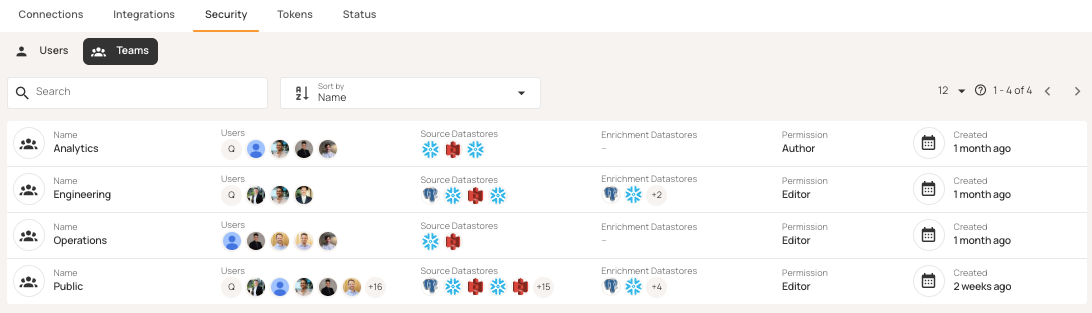
Team and role settings in Qualytics make sure everyone has the right access while keeping visibility shared across functions.
Full programmatic access
CI/CD pipelines and agentic workflows require programmatic control over quality operations. Platforms should provide three access layers:
- REST APIs expose full features (trigger scans, create rules, manage datastores, query anomalies).
- CLI tools integrate with CI/CD pipelines and tools like Terraform.
- MCP servers enable agentic workflows where AI assistants operate without human intervention.
Make sure the platform's features are fully available through APIs, not just that APIs exist. Some platforms let you trigger scans via API but require the UI for rule management, which breaks CI/CD integration. If you can't change rules programmatically, you can't version quality checks with your code.
An API-first design lets you set up quality gates. You can trigger scans before moving to production and block deployments if thresholds are not met. Here's how to trigger a scan using the Qualytics Python library:
import qualytics.qualytics as qualytics

DATASTORE_ID = 1172
CONTAINER_NAMES = ["CUSTOMER", "NATION"]

qualytics.scan_operation(
    datastores=str(DATASTORE_ID),
    container_names=CONTAINER_NAMES,
    container_tags=None,
    incremental=False,
    remediation="none",
    enrichment_source_record_limit=10,
    greater_than_batch=None,
    greater_than_time=None,
    max_records_analyzed_per_partition=10000,
    background=False,
)
Read-in-place security architecture
There are two main architectural approaches. Copy-to-platform means moving your source data into the vendor's infrastructure. Read-in-place runs checks in your own environment without copying the data.
Copying data to a vendor's platform can create security risks. Sensitive data is now stored in two places, which increases the risk of attacks and makes data residency compliance harder. Personally identifiable information (PII) is duplicated, and breach requirements become more complex.
Read-in-place eliminates these problems. Platforms use read-only credentials, load data into temporary memory, run checks, write results to your enrichment store, and then delete the temporary data. Your raw data never leaves your environment, and production data can't be changed because the platform doesn't have write access. This is important for regulated industries. For example, financial services avoid data residency complications, healthcare maintains HIPAA compliance without requiring business associate agreements (BAAs), and government agencies satisfy data sovereignty requirements.
Read-in-place keeps your current security controls in place. Access policies, encryption, network segmentation, and audit logging all stay the same. The table below shows how the two approaches compare:
Queryable enrichment data store
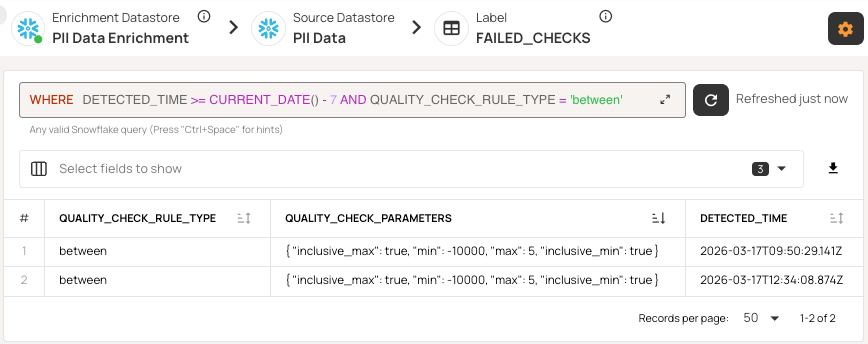
Quality findings should be queryable assets, not data locked in proprietary UIs. Platforms should write check results, anomalies, and metrics to a separate enrichment datastore you own.
Choose systems that store results in standard datastores like Snowflake, Postgres, or BigQuery, so you can query them with SQL. You can then use tools like Power BI or Tableau to build custom dashboards that combine quality metrics with business KPIs. You can also join anomaly data with operational metrics to see how pipeline changes affect quality.
This approach means you don't have to rely on the vendor's UI updates. You can build the reports you need by querying the enrichment store, track trends by domain, link violations to their sources, and monitor improvements without waiting for new vendor features.
Direct SQL access also supports automated workflows. AI assistants can check quality status, link anomalies to deployments, and suggest possible root causes on their own.
Qualytics uses this approach by saving all quality findings in your enrichment datastore, so you can access failed checks, anomalies, and metrics directly with SQL.
Flexible deployment
Deployment needs depend on your security and compliance requirements. Platforms should support several deployment models:
- Managed cloud: The vendor handles infrastructure, updates, and scaling, so you have the least operational overhead.
- Single-tenant: This option gives you the convenience of the cloud but with more isolation than multi-tenant SaaS. (Software as a Service).
- On-premises Kubernetes: This is for strict compliance needs, where regulated industries require tools to run inside their own infrastructure.
Choosing a deployment model is a key decision. If your organization needs on-premises for compliance, you can rule out SaaS-only platforms right away. Hybrid deployments let you monitor less-sensitive data in the cloud while keeping regulated data on-premises.
{{banner-small-1="/banners"}}
Last thoughts
When evaluating platforms, focus on features that keep your data quality program sustainable as your data, schemas, and teams grow. Look for automated inference to reduce manual work as data increases, and AI features that make the system better over time without constant tuning. Make sure the security setup protects your production data while letting you query results. Programmatic access should let you fit quality checks into your existing pipelines and workflows.
Qualytics is designed around these principles. The aim is not just to fix today's data quality issues but to build a strong foundation for reliable analytics as your data environment becomes more complex.
Chapters
Improving Data Governance and Quality: Better Analytics and Decision-Making
Learn about the relationship between data governance and quality, including key concepts, implementation examples, and best practices for improving data integrity and decision-making.
Data Quality Checks: Tutorial & Automation Best Practices
Learn the fundamentals of data quality checks, like structural and logical validation, monitoring data volume, and anomaly detection, using practical examples.
Data Quality Assessment: Tutorial & Implementation Best Practices
Learn systematic approaches to assess data quality using automated tools and best practices for reliable validation.
Data Quality Dimensions: A Complete Guide with Examples
Learn the eight data quality dimensions every data engineer needs to ensure reliable, accurate data pipelines.
Data Quality Scorecard: Dimensions, Granularity, and Best Practices
Learn how a data quality scorecard helps you measure, track, and improve your organization's data quality.
What to Look for in Data Quality Software: A Guide to Features
Learn which data quality software features help teams build and sustain scalable, automated quality programs.
From Reactive to Reliable: A Guide to Modern Data Quality Frameworks
Learn the six core components of a data quality framework and how they work together to ensure reliable data.
Data Quality Automation: How Modern Platforms Validate at Scale
Learn how automated data quality platforms infer validation rules, detect anomalies, and support remediation at scale.
Data Validation Software: 10 Must-Have Features to Look For
Learn how to evaluate data validation software using 10 must-have features for scalable, automated data quality.
The Data Quality Maturity Model: A Six-level Model for AI Readiness
Learn the six-level data quality maturity model that maps your organization's path from ad hoc fixes to proactive AI-augmented governance.
Data Quality Metrics Examples: The Complete Guide
Learn how to turn abstract data quality dimensions into computable, actionable metrics that catch pipeline failures and data errors before they become incidents.
How to Choose the Best Data Quality Tools for Your Team: Key Features and Benefits
Learn what modern data quality tools do, why they matter, and how they use AI and automation to keep your data trustworthy.