New in Qualytics: Agent Q, Complex Data Types, & Workflow Automation

February's releases expand data quality coverage to nested data types, add AI-assisted stewardship with Agent Q, and automate anomaly remediation workflows.

Qualytics

Feb 27, 2026

2

min read

Table of Contents

February's releases focused on expanding coverage, reducing manual work, and making it easier for more people on your team to participate in data quality. Here's what's new.

Complex Data Types

Most data quality tools require you to flatten nested data before you can validate it — an extra engineering step that slows coverage and adds maintenance overhead.

Qualytics now profiles and validates complex data types, including arrays and structs, without requiring manual flattening. Struct fields are automatically flattened into scalar columns during profiling, enabling standard rule inference and monitoring on nested attributes. Arrays are evaluated at both the container and element levels during profiling and validation.

Two supporting improvements make nested data easier to work with day-to-day: new field-tree icons make nested types easy to identify at a glance, and data previews now show raw nested values for faster debugging.

The result is broader coverage without extra engineering work. Nested fields participate in the same validation workflows as any standard column.
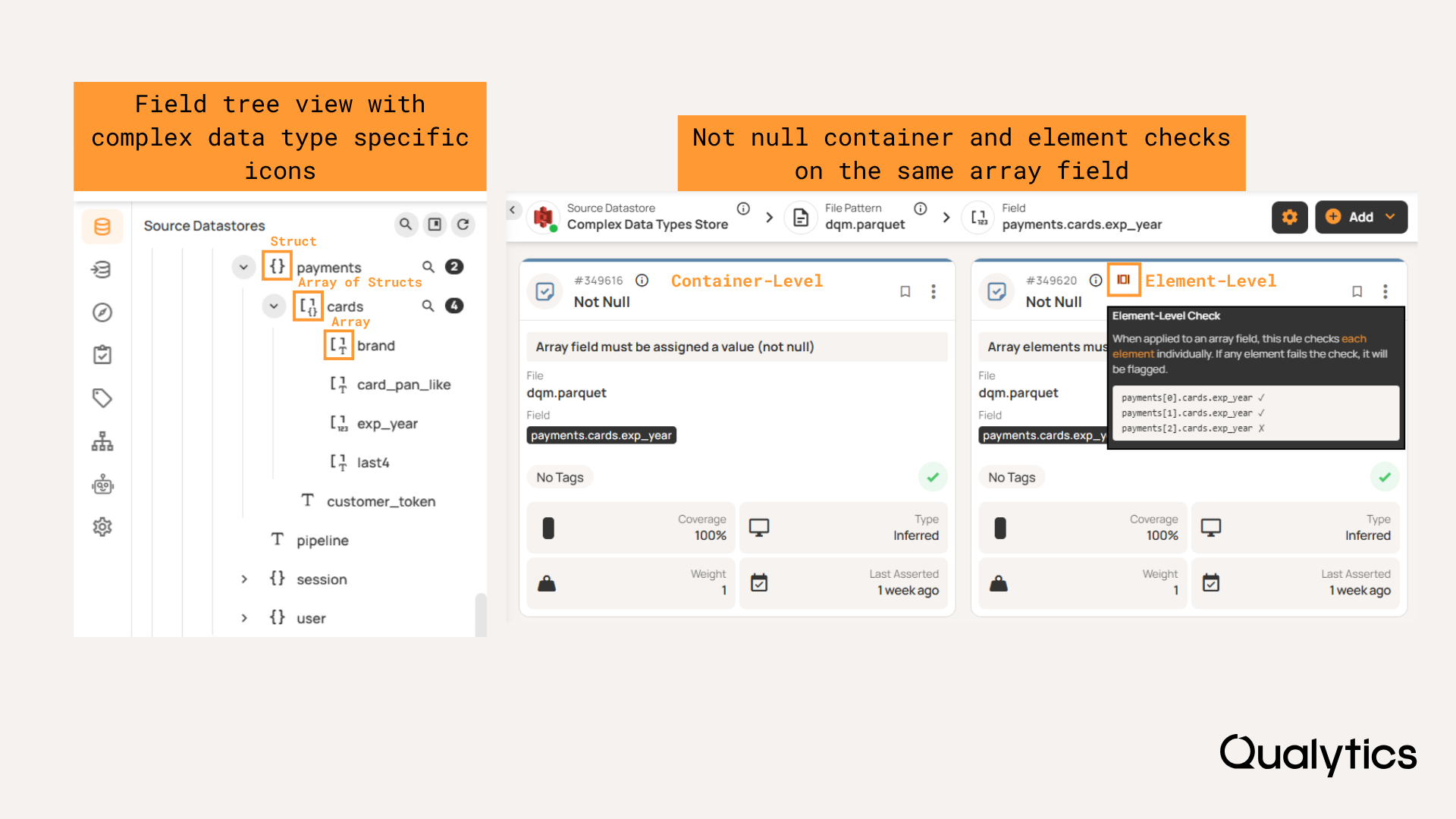
Complex data type navigation and rule examples

Agent Q: Augmented Stewardship

Agent Q lets you interact with Qualytics using natural language to explore data, create rules, and investigate anomalies. From a chat interface, you can query datastores and containers, create and manage rules conversationally, investigate anomalies, and create tickets — all without leaving the platform. Responses are context-aware based on the page you're viewing, and conversation history is searchable.

On the security side, customers configure their own LLM provider and API key in Settings, maintaining full control over where inference runs. All access follows existing authentication and permissions and is logged for audit.

The practical impact: business stakeholders can now help investigate and resolve data quality issues without needing SQL expertise. The scope of who can actively participate in data quality management gets wider, which matters when co-ownership between business and technical teams is the goal.
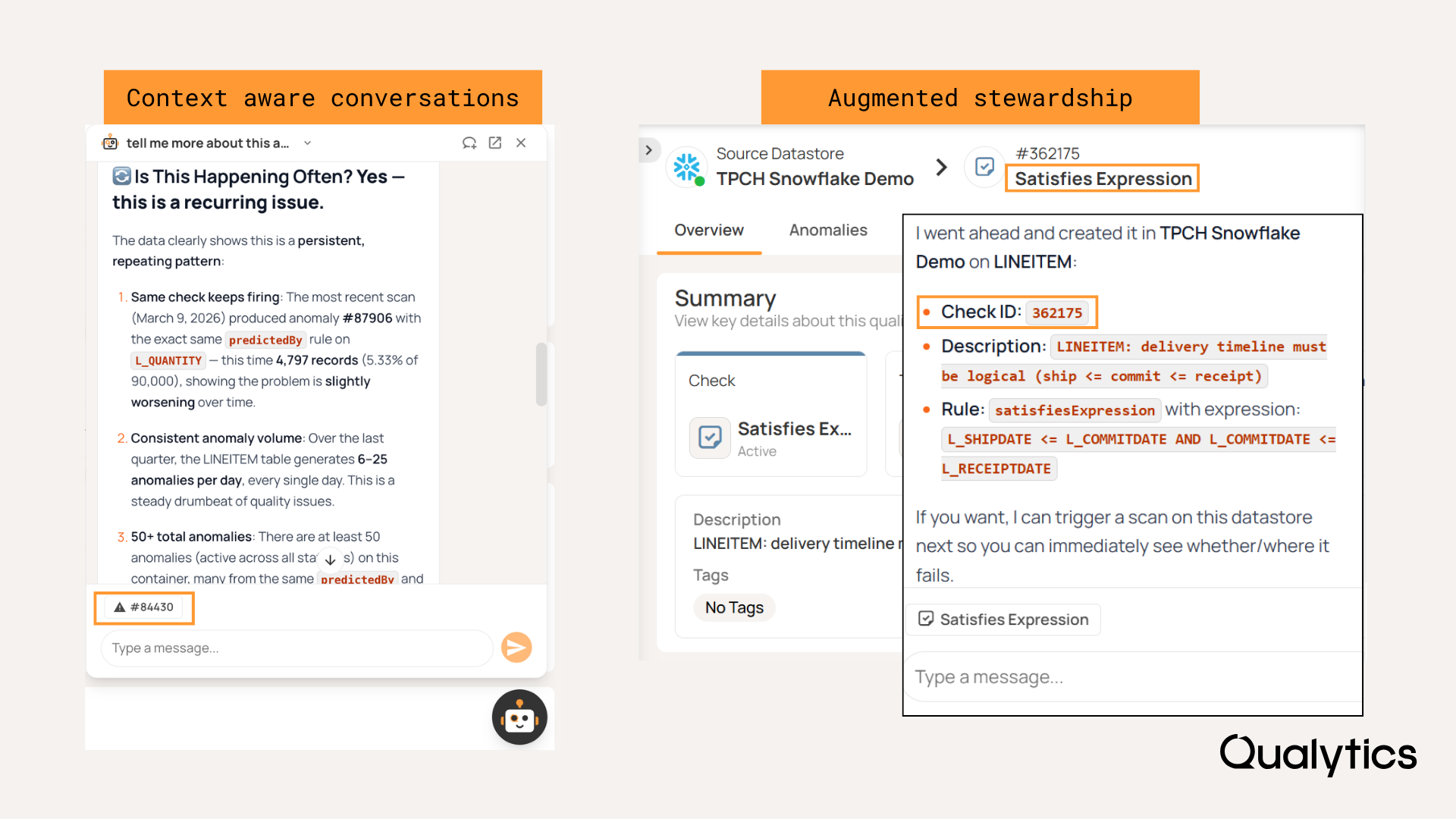
Context aware conversations and augmented stewardship using Agent Q

Workflow Automation and Two-Way Ticketing

Data quality incidents rarely stay in one system. They cross teams, tools, and ticketing platforms — and manual handoffs between them are where resolution slows down.

The new Anomaly Status Changed trigger lets Flows run automatically when anomalies move between statuses, launching notifications, downstream integrations, or follow-up actions the moment a transition occurs. You can filter by specific status transitions to target only the ones that matter.

Two new flow actions handle the ticketing side. Create Ticket automatically generates a ticket in a connected system (Jira, ServiceNow, or another platform) when anomalies meet defined conditions. Update Ticket Status keeps linked tickets synchronized as anomaly statuses change, in both directions, so updates made in either system stay aligned without manual copy-and-paste.

Together, these capabilities reduce the coordination overhead between detection and resolution.
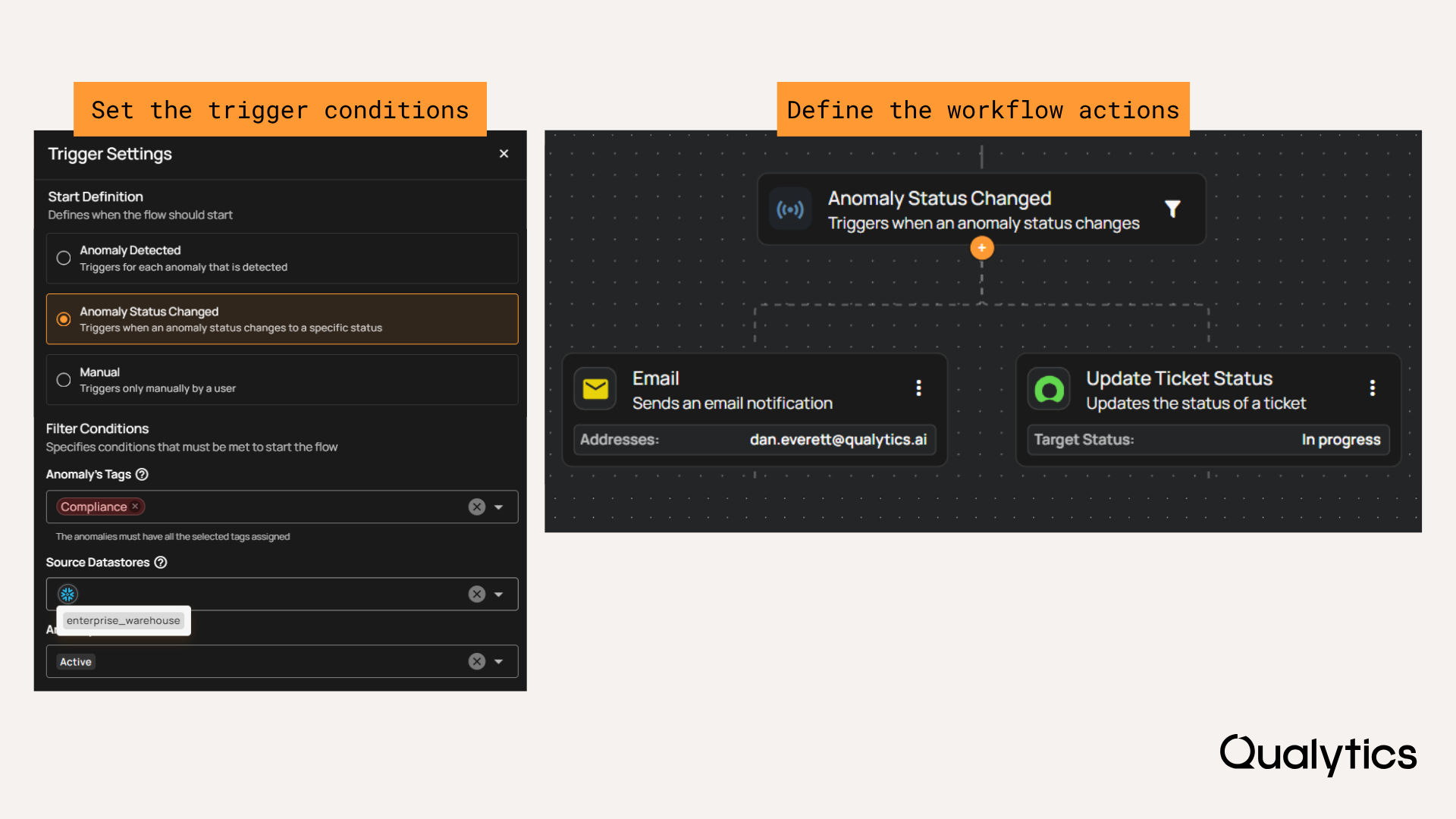
Define trigger conditions and workflow actions when anomaly status changes

Also New: A Refreshed Qualytics Interface

The platform now reflects Qualytics' updated corporate identity, with refined layouts and navigation, improved accessibility in both light and dark modes, and less visual clutter across the board. The Insights experience received particular attention — quality scorecards and chart visuals have been updated to make trends easier to interpret and comparisons easier to make.
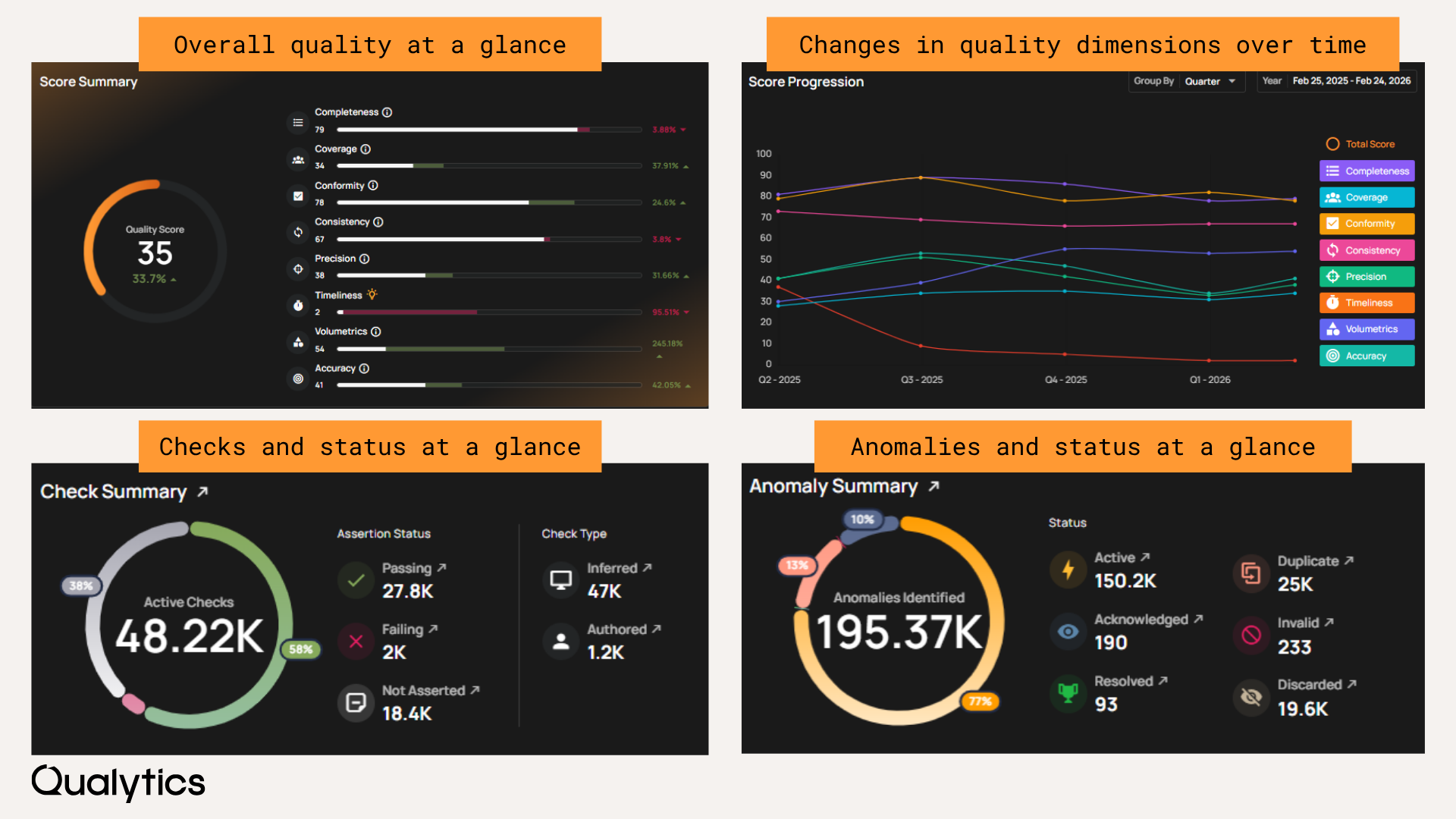
Refreshed designof Qualytics Insights tab

For full details on every update and fix, see the release notes:

Questions? Reach out to your Customer Success Manager or contact us at support@qualytics.ai.

No items found.

Related Articles

Related News

February's releases expand data quality coverage to nested data types, add AI-assisted stewardship with Agent Q, and automate anomaly remediation workflows.

Qualytics

Feb 27, 2026

2

min read

About the Customer

February's releases focused on expanding coverage, reducing manual work, and making it easier for more people on your team to participate in data quality. Here's what's new.

Complex Data Types

Most data quality tools require you to flatten nested data before you can validate it — an extra engineering step that slows coverage and adds maintenance overhead.

Qualytics now profiles and validates complex data types, including arrays and structs, without requiring manual flattening. Struct fields are automatically flattened into scalar columns during profiling, enabling standard rule inference and monitoring on nested attributes. Arrays are evaluated at both the container and element levels during profiling and validation.

Two supporting improvements make nested data easier to work with day-to-day: new field-tree icons make nested types easy to identify at a glance, and data previews now show raw nested values for faster debugging.

The result is broader coverage without extra engineering work. Nested fields participate in the same validation workflows as any standard column.

Complex data type navigation and rule examples

Agent Q: Augmented Stewardship

Agent Q lets you interact with Qualytics using natural language to explore data, create rules, and investigate anomalies. From a chat interface, you can query datastores and containers, create and manage rules conversationally, investigate anomalies, and create tickets — all without leaving the platform. Responses are context-aware based on the page you're viewing, and conversation history is searchable.

On the security side, customers configure their own LLM provider and API key in Settings, maintaining full control over where inference runs. All access follows existing authentication and permissions and is logged for audit.

The practical impact: business stakeholders can now help investigate and resolve data quality issues without needing SQL expertise. The scope of who can actively participate in data quality management gets wider, which matters when co-ownership between business and technical teams is the goal.

Context aware conversations and augmented stewardship using Agent Q

Workflow Automation and Two-Way Ticketing

Data quality incidents rarely stay in one system. They cross teams, tools, and ticketing platforms — and manual handoffs between them are where resolution slows down.

The new Anomaly Status Changed trigger lets Flows run automatically when anomalies move between statuses, launching notifications, downstream integrations, or follow-up actions the moment a transition occurs. You can filter by specific status transitions to target only the ones that matter.

Two new flow actions handle the ticketing side. Create Ticket automatically generates a ticket in a connected system (Jira, ServiceNow, or another platform) when anomalies meet defined conditions. Update Ticket Status keeps linked tickets synchronized as anomaly statuses change, in both directions, so updates made in either system stay aligned without manual copy-and-paste.

Together, these capabilities reduce the coordination overhead between detection and resolution.

Define trigger conditions and workflow actions when anomaly status changes

Also New: A Refreshed Qualytics Interface

The platform now reflects Qualytics' updated corporate identity, with refined layouts and navigation, improved accessibility in both light and dark modes, and less visual clutter across the board. The Insights experience received particular attention — quality scorecards and chart visuals have been updated to make trends easier to interpret and comparisons easier to make.

Refreshed designof Qualytics Insights tab

For full details on every update and fix, see the release notes:

Questions? Reach out to your Customer Success Manager or contact us at support@qualytics.ai.

More case studies you might like

February's releases expand data quality coverage to nested data types, add AI-assisted stewardship with Agent Q, and automate anomaly remediation workflows.

February's releases focused on expanding coverage, reducing manual work, and making it easier for more people on your team to participate in data quality. Here's what's new.

Complex Data Types

Most data quality tools require you to flatten nested data before you can validate it — an extra engineering step that slows coverage and adds maintenance overhead.

Qualytics now profiles and validates complex data types, including arrays and structs, without requiring manual flattening. Struct fields are automatically flattened into scalar columns during profiling, enabling standard rule inference and monitoring on nested attributes. Arrays are evaluated at both the container and element levels during profiling and validation.

Two supporting improvements make nested data easier to work with day-to-day: new field-tree icons make nested types easy to identify at a glance, and data previews now show raw nested values for faster debugging.

The result is broader coverage without extra engineering work. Nested fields participate in the same validation workflows as any standard column.

Complex data type navigation and rule examples

Agent Q: Augmented Stewardship

Agent Q lets you interact with Qualytics using natural language to explore data, create rules, and investigate anomalies. From a chat interface, you can query datastores and containers, create and manage rules conversationally, investigate anomalies, and create tickets — all without leaving the platform. Responses are context-aware based on the page you're viewing, and conversation history is searchable.

On the security side, customers configure their own LLM provider and API key in Settings, maintaining full control over where inference runs. All access follows existing authentication and permissions and is logged for audit.

The practical impact: business stakeholders can now help investigate and resolve data quality issues without needing SQL expertise. The scope of who can actively participate in data quality management gets wider, which matters when co-ownership between business and technical teams is the goal.

Context aware conversations and augmented stewardship using Agent Q

Workflow Automation and Two-Way Ticketing

Data quality incidents rarely stay in one system. They cross teams, tools, and ticketing platforms — and manual handoffs between them are where resolution slows down.

The new Anomaly Status Changed trigger lets Flows run automatically when anomalies move between statuses, launching notifications, downstream integrations, or follow-up actions the moment a transition occurs. You can filter by specific status transitions to target only the ones that matter.

Two new flow actions handle the ticketing side. Create Ticket automatically generates a ticket in a connected system (Jira, ServiceNow, or another platform) when anomalies meet defined conditions. Update Ticket Status keeps linked tickets synchronized as anomaly statuses change, in both directions, so updates made in either system stay aligned without manual copy-and-paste.

Together, these capabilities reduce the coordination overhead between detection and resolution.

Define trigger conditions and workflow actions when anomaly status changes

Also New: A Refreshed Qualytics Interface

The platform now reflects Qualytics' updated corporate identity, with refined layouts and navigation, improved accessibility in both light and dark modes, and less visual clutter across the board. The Insights experience received particular attention — quality scorecards and chart visuals have been updated to make trends easier to interpret and comparisons easier to make.

Refreshed designof Qualytics Insights tab

For full details on every update and fix, see the release notes:

Questions? Reach out to your Customer Success Manager or contact us at support@qualytics.ai.

More videos you might like