Release 2025.2.13

Mid-February 2025 release introducing advanced ML-powered validation, improved dashboard customization, enhanced security controls, and optimized scan performance capabilities.

Rafael Osiro

Feb 13, 2025

3

min read

Table of Contents

Note
These notes catch up with several releases since our last published update on 2025.2.6 and are current as of the 2025.2.13 version of the platform
.

Feature Enhancements

Explore View

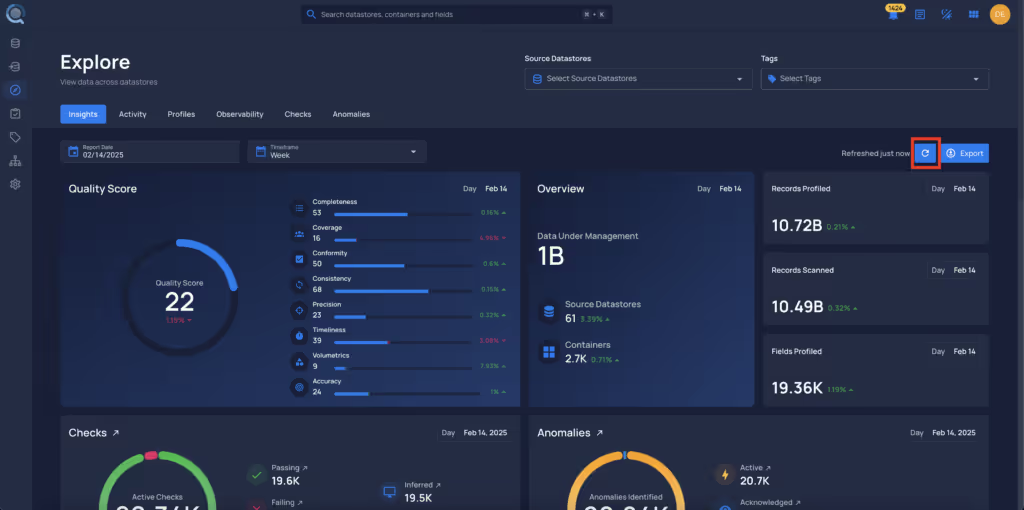
  • Users can now refresh the Insights data.
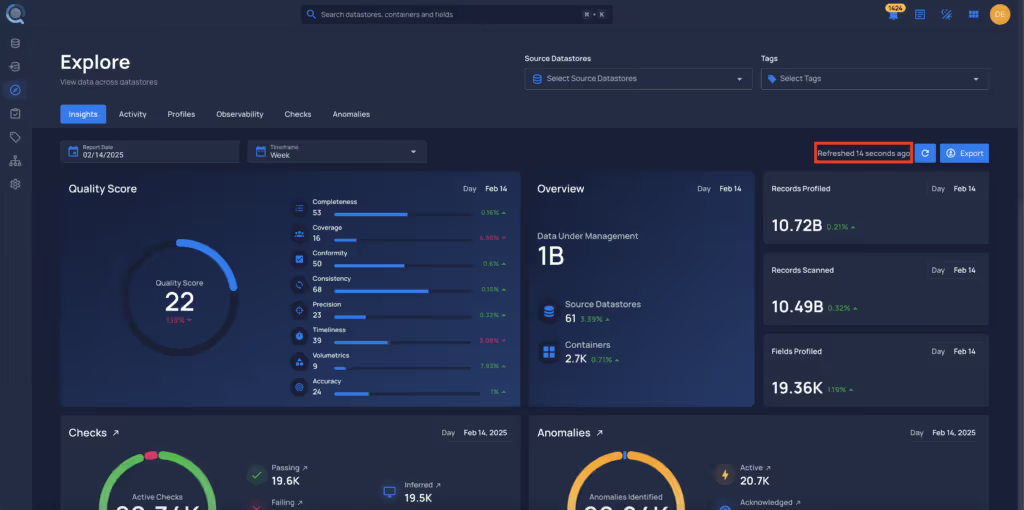
  • A label will indicate when the page was last refreshed.
System Appearance

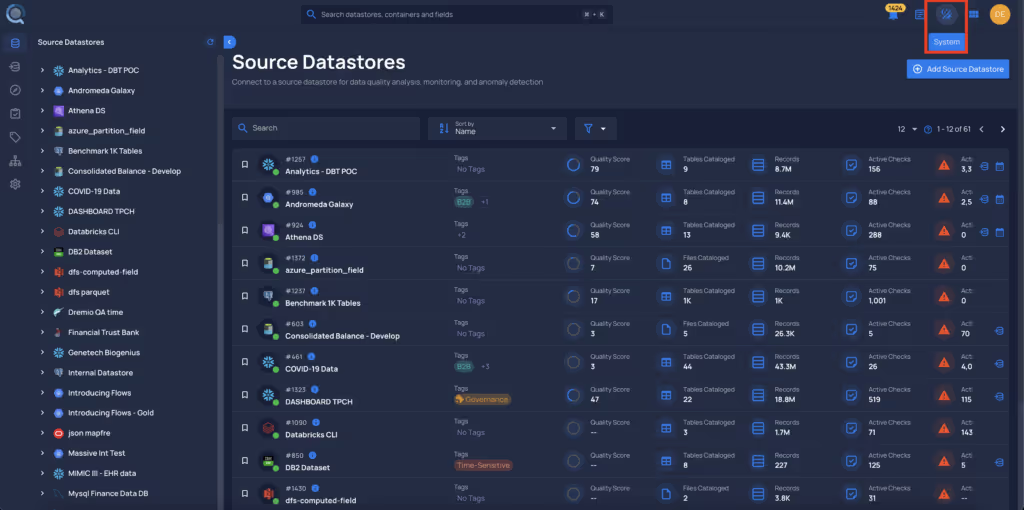
  • Users can now select the System theme.
    • This setting automatically adjusts based on the user's system theme, switching between dark and light mode.

Users can still manually select dark or light mode.
Dismiss Popup Window

  • Users can now dismiss popup windows by pressing the Esc key, improving the user experience.

General Fixes

  • External Scan
    • Fixed an issue where attempting to run an external scan resulted in a "Request Failed" error message.
  • Explore View
    • Fixed an issue causing excessively long loading times.

As usual, our User Guide and accompanying Change Log captures more details about this release.

No items found.

Related Articles

Related News

Discover More From Qualytics.

Join the companies using Qualytics to make data quality proactive, automated, and shared across business and data teams.

Release 2025.2.13

Mid-February 2025 release introducing advanced ML-powered validation, improved dashboard customization, enhanced security controls, and optimized scan performance capabilities.

Rafael Osiro

Feb 13, 2025

3

min read

About the Customer

Note
These notes catch up with several releases since our last published update on 2025.2.6 and are current as of the 2025.2.13 version of the platform
.

Feature Enhancements

Explore View

  • Users can now refresh the Insights data.
  • A label will indicate when the page was last refreshed.

System Appearance

  • Users can now select the System theme.
    • This setting automatically adjusts based on the user's system theme, switching between dark and light mode.

Users can still manually select dark or light mode.

Dismiss Popup Window

  • Users can now dismiss popup windows by pressing the Esc key, improving the user experience.

General Fixes

  • External Scan
    • Fixed an issue where attempting to run an external scan resulted in a "Request Failed" error message.
  • Explore View
    • Fixed an issue causing excessively long loading times.

As usual, our User Guide and accompanying Change Log captures more details about this release.

More case studies you might like

Discover More From Qualytics.

Release 2025.2.13

Mid-February 2025 release introducing advanced ML-powered validation, improved dashboard customization, enhanced security controls, and optimized scan performance capabilities.

Note
These notes catch up with several releases since our last published update on 2025.2.6 and are current as of the 2025.2.13 version of the platform
.

Feature Enhancements

Explore View

  • Users can now refresh the Insights data.
  • A label will indicate when the page was last refreshed.

System Appearance

  • Users can now select the System theme.
    • This setting automatically adjusts based on the user's system theme, switching between dark and light mode.

Users can still manually select dark or light mode.

Dismiss Popup Window

  • Users can now dismiss popup windows by pressing the Esc key, improving the user experience.

General Fixes

  • External Scan
    • Fixed an issue where attempting to run an external scan resulted in a "Request Failed" error message.
  • Explore View
    • Fixed an issue causing excessively long loading times.

As usual, our User Guide and accompanying Change Log captures more details about this release.

More videos you might like

Discover More From Qualytics.