Late November 2025 release delivering advanced profiling capabilities, improved scan performance, enhanced security features, and year-end platform optimizations across modules.

Nov 27, 2025
3
min read
Table of Contents

These notes catch up with several releases since our last published update on 2025.11.6 and are current as of the 2025.11.27 version of the platform.
Quality Score Over Time and Enhanced Insights Dashboard
Track your data quality journey with Quality Score Over Time on the Insights page. Interactive charts display score progression with dimension-level breakdowns, giving you a clear view of how your data quality evolves over time.

Monitor your scanning activity with the new Containers Scanned metric with trend indicators, and identify which rule types generate the most anomalies with the Failed Check Distribution histogram. The reorganized Insights page now features improved section grouping: Checks & Profiling brings together Check Summary, Check Distribution, and Profiling Activity, while Anomalies & Scanning combines Anomalies Summary, Failed Check Distribution, and Scanning Activity for better visual hierarchy.
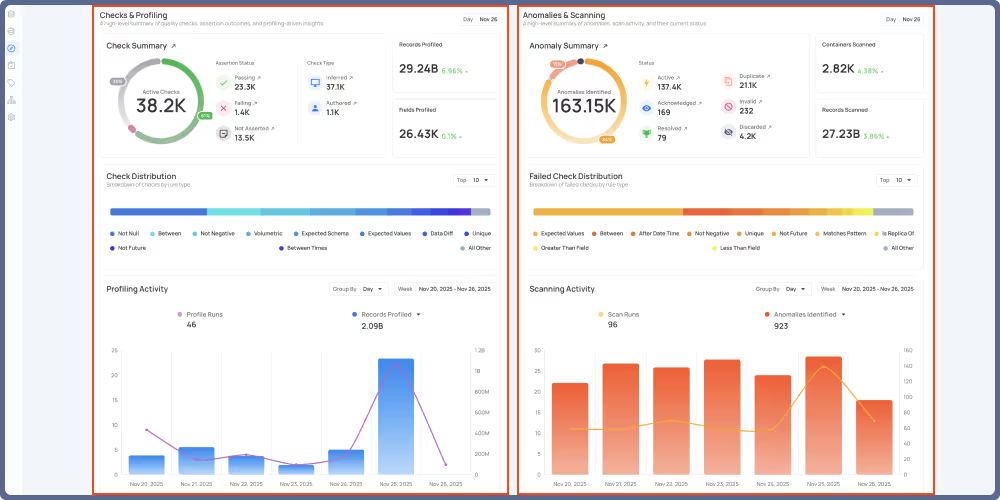
When exploring a Source Datastore, Container, or Field, you'll now receive detailed explanations and actionable recommendations whenever Quality Score Dimensions fall below 30, helping you quickly understand and improve your data quality.

Automated Anomaly Lifecycle Management Using New Flow Actions
Automatically archive inactive anomalies with full control over the process. Select the target status, optionally assign tags, and add comments to provide context during archiving, ensuring your team understands why anomalies were moved.

Remove outdated anomalies that no longer require attention. Filter anomalies by source datastores and tags, with additional status filters available exclusively for Delete operations, giving you precise control over which anomalies are permanently removed.

Check Permutations with the each() Keyword
Simplify the creation of multiple check permutations with the new each() keyword in Check Templates.
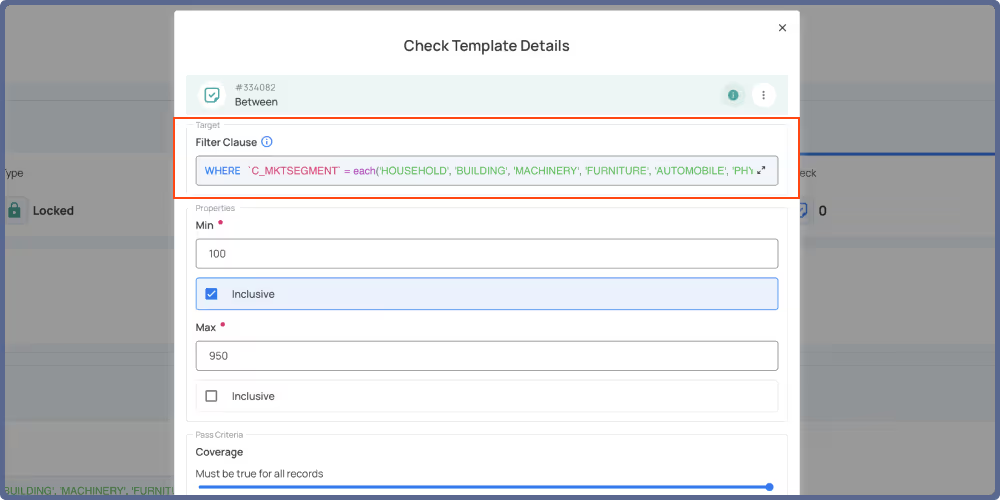
Define your filter arrays once and automatically expand a single filter into multiple checks—one for each specified value—eliminating repetitive manual configuration.
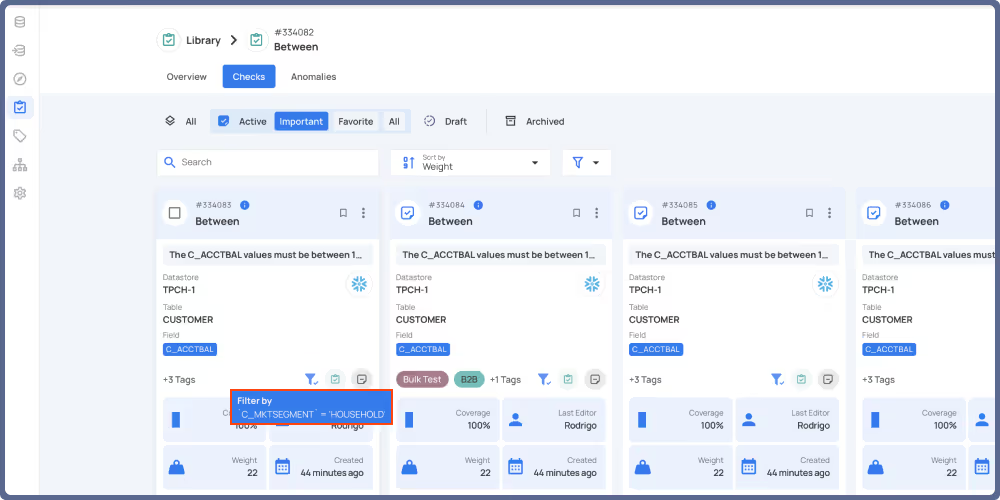
General Fixes and Improvements
Fixes (6)
- Fixed history flow side panel not displaying after specific flow editing operations.
- Corrected Quality Score displaying as 0 when navigating between datastores.
- Resolved Expected Values check displaying a blank list when configured with numeric values.
- Fixed issue where Observability triggers were not being recorded properly.
- Correct operations getting stuck in running status instead of being marked as failed.
- Resolved flow executions getting stuck in running status when multiple actions completed concurrently.
Improvements (4)
- Enhanced draft check activation with a new
Activateoption available directly from the check overview page. - Improved Dry Run validation for Is Replica Of checks with filters, now querying the number of records matching the filter to accurately compare left and right side row counts.
- Enhanced file pattern configuration with the ability to edit the relative path field, enabling advanced globbing patterns for more flexible file selection.
- Improved user navigation by adding a View Results button to Materialize and Export operation cards, allowing direct access to the relevant Enrichment tab with shareable URLs.
As usual, our User Guide and accompanying Change Log captures more details about this release.
Chapters
Related Articles
Related News
Discover More From Qualytics.
Join the companies using Qualytics to make data quality proactive, automated, and shared across business and data teams.