Data teams often need a reliable way to detect when something in their Snowflake tables has changed—whether someone updates a row, deletes data, or modifies a column. These changes can introduce quality issues, break downstream processes, or cause compliance risks if they go unnoticed.
This use case demonstrates how a team developed a lightweight monitoring process utilizing Snowflake Time Travel and Qualytics Quality Checks to surface data and schema changes within minutes, without requiring the addition of new pipelines or infrastructure.
The Challenge
The requirement was direct:
“If someone updates data now, notify us now.”
The team needed visibility into:
- Structural changes — added, removed, or modified columns
- Data changes — inserted, updated, or deleted rows
And they wanted a solution that would:
- Respond within minutes
- Require no new ETL logic or snapshot tables
- Remain easy to explain to non-technical stakeholders
- Leverage existing Snowflake and Qualytics capabilities
Approach and Design Principles
The team designed a solution that would:
- Minimize new infrastructure
- Use Snowflake-native Time Travel as the point-in-time reference
- Reuse Qualytics’ existing comparison, schema verification, and alerting features
Instead of embedding change-detection logic inside Snowflake stored procedures, they took advantage of Qualytics’ built-in mechanisms for identifying discrepancies and sending alerts.
Proof of Concept Solution
The POC consisted of five steps that worked together to detect changes quickly and reliably.
1. Establish a Point-in-Time Baseline
Using Snowflake Time Travel, the team retrieved a snapshot of the table as it existed a few minutes earlier. This acted as the baseline for detecting differences.
SELECT *
FROM METRICS_ALL AT (OFFSET => -60*5);
In this example, the query looks at data as of five minutes earlier, but the offset can be adjusted to fit your monitoring window. Remember that this is a Computed Table.
This approach required no persistent historical tables, keeping the design simple and efficient.
| Note: 🧩 Time Travel in Snowflake enables access to historical versions of data within a retention window. Learn more in the official docs: https://docs.snowflake.com/en/user-guide/data-time-travel |
2. Add Two Qualytics Checks
To monitor both data-level and schema-level drift, two checks were added to the table.
a. Data Diff Check
This check compares the live table (left side) against the Time Travel baseline (right side) and detects:
- Inserted rows
- Updated rows
- Deleted rows

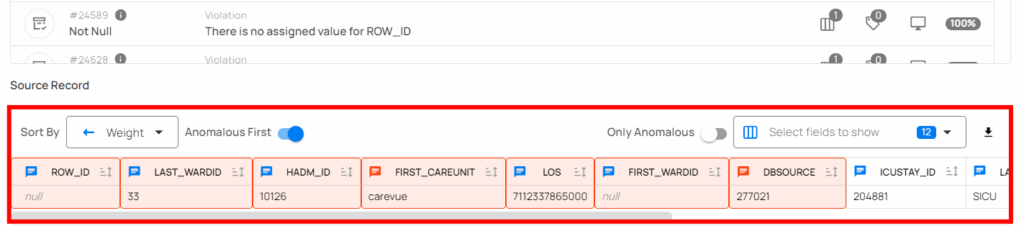
Example anomaly (removed row):
b. Expected Schema Check
This check identifies any:
- Added columns
- Removed columns
- Modified columns
Together, the two checks capture both DML (row-level) and DDL (schema-level) changes.
3. Trigger Notifications with a Qualytics Flow
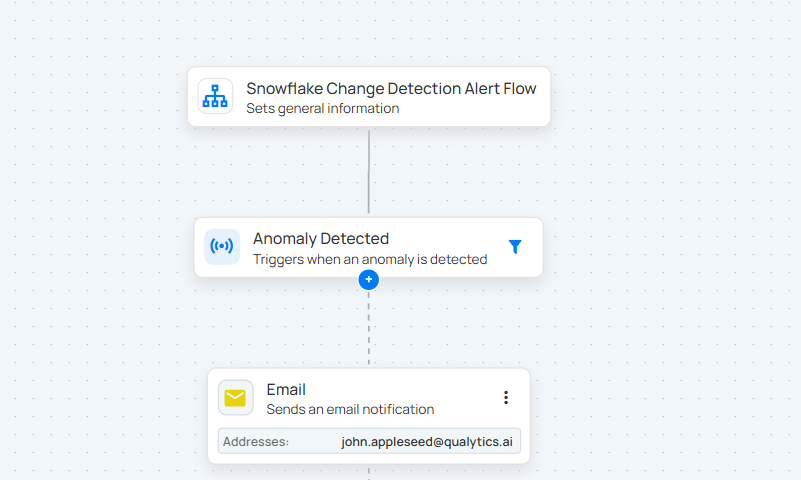
A Qualytics Flow was configured to run both checks every five minutes.
When an anomaly is detected, the Flow sends a notification—typically by Slack or email—to ensure immediate visibility.
Example Flow setup:
Trigger configuration:
- Trigger Type: Anomaly Detected
This ensures alerts are automated and real-time.
4. (Optional) Use Tags for Simpler Organization
Tags were added to:
- The source table
- The checks
- The Flow
This allows triggers to reference a single tag instead of manually selecting individual rule types, making the setup easier to manage as the environment grows.
5. Close the Loop with a Scheduled Scan
A Scan Operation was scheduled to match the Time Travel interval (e.g., every five minutes). This step is essential because it:
- Runs the comparison
- Records all differences as source records in Qualytics
- Persists findings even after Snowflake’s Time Travel retention period expires
Scheduled Scan configuration:

This ensures long-term auditability and historical tracking of detected changes.
Why This Approach Works
This design provides several important benefits:
- Near-real-time monitoring: Checks can run every few minutes or be triggered by new writes.
- Minimal storage footprint: No persistent snapshots are required—Time Travel supplies point-in-time data on demand.
- Actionable alerts: Notifications include schema details and row-level diffs for quick root-cause analysis.
- Auditability: Detected differences remain stored in Qualytics, even after Snowflake purges its own history.
Implementation Highlights
Time Travel baseline retrieved using:
SELECT ... FROM metrics_all AT(TIMESTAMP => :baseline_ts);
- Two checks used:
- Expected Schema Check: Catches breaking column changes.
- Data Diff Check: Compares live vs baseline using primary key alignment.
- Expected Schema Check: Catches breaking column changes.
- Alerts are sent through email or Slack.
Considerations and Trade-offs
- Time Travel retention: Typically up to 90 days — sufficient for short-window baselines. Data Diff persists findings beyond that window.
- Primary key selection: Ensure a stable key for accurate row-level diffs.
- Comparator tuning: Focus on material business changes, not noise.
- Cost vs frequency: Balance check frequency and compute cost; event-driven runs can optimize both.
Results
In practice, this setup provided:
- Immediate alerts for row-level changes
- Warnings for column additions, removals, or modifications
- A lightweight architecture with no extra pipelines
- Clear visibility for stakeholders
- High confidence that unintended changes would not go unnoticed